Notes Tracker, KDP: A Practical Tool for Low-Content Publishing Efficiency
In the growing field of low-content publishing, small details often determine whether a product feels complete or merely functional. A journal or planner may have strong cover design and thoughtful interior pages, but without a dedicated space for capturing quick ideas, tracking key information, or logging references, the overall utility can feel limited. Notes Tracker, KDP addresses this gap directly. Designed as a one-page add-on for Kindle Direct Publishing projects, it offers a streamlined solution for authors and publishers who want to add a reliable note-keeping component without redesigning their entire layout. This article examines what Notes Tracker, KDP actually delivers, who benefits most from it, and how it performs in real publishing workflows.
What Notes Tracker, KDP Offers
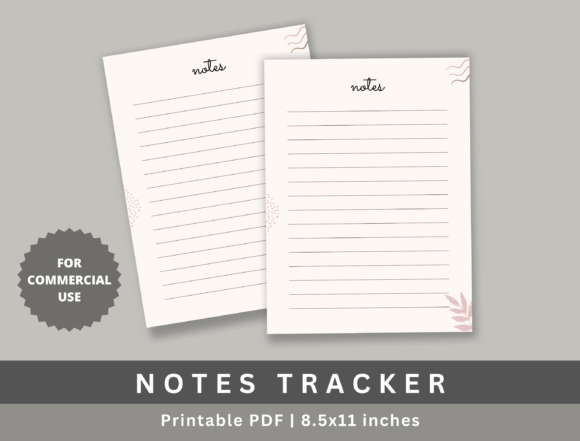
Notes Tracker, KDP is a single-page PDF template built specifically for KDP’s standard 8.5 x 11 inch format. It functions as a supplemental insert for journals, planners, logs, or any low-content book that would benefit from a dedicated notes section. The template is high-resolution and print-ready, which means no additional editing or formatting is required before uploading. Publishers receive a file that aligns with KDP’s technical specifications, including proper bleed margins and resolution standards.
The core value here is simplicity. Rather than building a notes page from scratch or adapting a generic template that may not fit KDP’s requirements, publishers can insert this ready-to-use page directly into their project. The purchase includes commercial usage rights, so the page can be used across multiple titles without additional licensing concerns. This makes it a repeatable asset for anyone producing several journals or planners per year.
Key Characteristics and Purpose
The Notes Tracker, KDP template is minimal by design. It avoids decorative flourishes that might clash with different interior styles. Instead, the layout focuses on clean lines, clear fields, and sufficient writing space. This neutrality is intentional: the page needs to work alongside various themes, from minimalist professional planners to more decorative creative journals.
The primary purpose of this template is efficiency. Low-content publishing often involves assembling multiple components—cover, interior pages, indexes, trackers, and back matter. A notes page may seem like a small piece, but sourcing or creating one that meets KDP’s print specifications can interrupt workflow. Notes Tracker, KDP removes that friction by delivering a single, compliant file that fits seamlessly into existing projects. It also serves a functional role for the end user: providing a structured yet flexible space for recording thoughts, tasks, or reference information without the constraints of a rigid form.
Strengths in Real-World Publishing
When evaluating any template for commercial publishing, the primary considerations are compatibility, print quality, and adaptability. Notes Tracker, KDP performs well across all three. The file is designed specifically for KDP’s 8.5 x 11 inch trim size, which is among the most common dimensions for printed journals and planners. This eliminates the need to resize or reformat, saving time and reducing the risk of errors during upload.
Print readiness is another notable strength. The high-resolution output ensures that lines remain sharp and text stays legible even when printed at scale. For publishers who order proof copies before release, this level of clarity matters. A notes page that looks crisp in digital preview but prints poorly can undermine the perceived quality of the entire book. Notes Tracker, KDP avoids that problem by meeting typical commercial print standards.
The commercial usage license adds practical value. Many templates restrict usage to personal projects or require separate licenses for each title. With Notes Tracker, KDP, publishers can use the page across multiple books, series, or product lines. This is particularly useful for those running an ongoing low-content publishing business where consistency and speed matter.
Usability and Practical Integration
Integration into a typical KDP workflow is straightforward. The publisher downloads the PDF, opens it in their preferred software, and inserts it into the appropriate position within their project—usually at the end of a planner section or as a back-matter page. Because the file is already sized and formatted, no additional scaling or cropping is necessary. For those using tools like Adobe InDesign, Canva, or Affinity Publisher, the page can be imported as a full-size element and placed directly into the document.
One practical consideration is file format. The product is a PDF, which is standard for KDP uploads. Publishers who work primarily in editable document formats like DOCX may need to convert or import accordingly. However, since most low-content publishing workflows already involve PDF output for final upload, this is rarely a significant obstacle.
Another usability detail is the page’s adaptability to different binding types. Whether the book uses perfect binding, spiral binding, or saddle stitching, the 8.5 x 11 inch page fits standard dimensions. Publishers should still test alignment in their own templates, particularly if they use custom margins or non-standard bleed settings. In most cases, the file integrates cleanly.
Who Benefits Most from Notes Tracker, KDP
This template is best suited for publishers who produce journals, planners, logs, or notebooks on a regular basis. If you publish multiple titles per month or per quarter, having a reliable, ready-to-use notes page can save hours of formatting time over the course of a year. It is also valuable for those who are new to KDP and want to avoid common formatting pitfalls. Instead of learning the intricacies of bleed margins and resolution requirements for a simple notes page, you can start with a proven file.
Professionals and entrepreneurs who use low-content books for client gifts, promotional items, or branded merchandise will also find the commercial license useful. Being able to include a consistent notes page across a series of branded products adds a polished touch without requiring custom design work each time.
Educators creating course-specific planners or workshop workbooks can benefit as well. A notes page gives participants space to capture supplementary ideas or action items, which enhances the usefulness of the printed material. The template’s neutral design means it won’t distract from course content or branding.
Freelancers and creators who design and publish on behalf of clients can also leverage the template. Since commercial use is included, you can integrate the notes page into client projects without additional licensing fees. This makes it a practical addition to a designer’s toolkit.
Quality and Long-Term Value
When assessing the long-term value of a template like Notes Tracker, KDP, the key factors are durability of design and consistency across print runs. Because the page is intentionally simple, it does not rely on trendy aesthetics that might look dated in a year or two. The clean, functional layout will continue to serve its purpose regardless of shifting design preferences.
Print quality remains stable across different printers and paper types. The high-resolution file ensures that lines and text remain sharp whether printed on standard bond paper or heavier stock. This consistency matters for publishers who order reprints over time and want each batch to match the original.
One possible limitation is that the template is limited to a single page. For publishers who need multi-page notes sections or more complex note-taking layouts, this may not be sufficient. However, the product is explicitly marketed as a one-page wonder, so expectations are clear. If you need multiple notes pages, you would purchase or create a more extensive solution. For those who simply need one clean, reliable page per book, this template delivers exactly that.
Professional Observations and Recommendations
In practice, the most valuable aspect of Notes Tracker, KDP is its reliability. When you are working on tight deadlines or managing several titles at once, not having to stop and verify dimensions, check resolution, or test print output for a notes page is a genuine time-saver. The file works as advertised, and that predictability is worth emphasizing.
For best results, insert the page into your document before finalizing the interior layout. This allows you to confirm that pagination, margins, and overall flow remain consistent. If you are using a tool that auto-adjusts page elements, lock the notes page in place to prevent accidental resizing.
Consider also how the notes page fits with your book’s overall structure. If your planner already includes built-in note sections, adding a separate notes page may be redundant. But if your journal or log lacks a dedicated space for free-form writing, this template fills that gap nicely.
For publishers who offer multiple trim sizes, note that this template is specifically designed for 8.5 x 11 inches. If you publish in other sizes, you would need to scale the file, which could affect print quality or alignment. This is not a limitation of the product itself, but a practical factor to consider before purchase.
Is Notes Tracker, KDP Right for Your Project
Deciding whether this template fits your needs depends largely on your publishing volume and your tolerance for formatting tasks. If you produce low-content books regularly and value efficiency, the time saved by using a pre-formatted, print-ready page is considerable. The commercial license further enhances its value by allowing repeated use across multiple titles without additional cost.
If you are a one-time publisher creating a single journal for personal use, a free or self-made notes page may suffice. But for anyone treating low-content publishing as a serious endeavor—whether as a side business, a client service, or a creative outlet—having a dependable, professional-grade component like Notes Tracker, KDP is a practical investment. It removes one more variable from the publishing process, letting you focus on content, design, and marketing rather than technical minutiae.
Ultimately, the best tools in low-content publishing are the ones that work without demanding extra attention. Notes Tracker, KDP earns its place in that category by being straightforward, functional, and ready to use. It does what it sets out to do, and for many publishers, that is exactly what a notes page should be.