2026 Blog Planner: Your Complete Content Strategy Toolkit
If you’ve ever sat down to write a blog post only to realize you have no idea what you planned for next week, you already know the feeling. The blank page stares back, and your content calendar exists only in your head—if it exists at all. That’s precisely where the 2026 Blog Planner steps in. This isn’t just another notebook with dates printed on it. It’s a thoughtfully structured system designed to help you move from scattered ideas to a consistent, organized publishing schedule.
Whether you’re a solo blogger juggling multiple platforms or a digital product seller building a brand, staying on top of your content workflow makes the difference between burnout and sustainable growth. The 2026 Blog Planner, available as a Canva KDP interior, gives you a flexible foundation you can adapt to your exact needs. Let’s walk through what makes this planner genuinely useful and how you can put it to work right away.
What Makes This Planner Stand Out
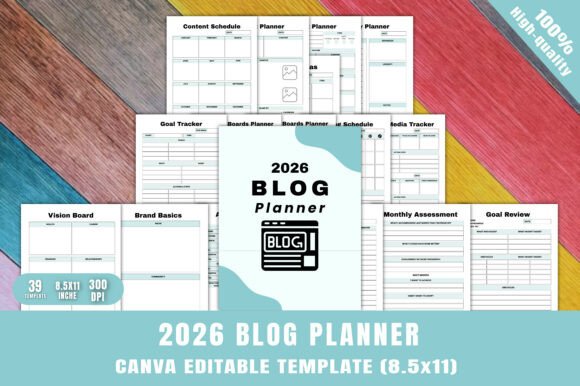
At first glance, the 2026 Blog Planner might look like a straightforward organizational tool. But the real value lies in its structure. With 39 unique, professionally designed pages, you get more than just monthly grids. You get a complete system that covers strategy, execution, and review.
The planner includes everything from a 2026 calendar and monthly pages (January through December) to brand-building worksheets like Brand Basics, My Audience, Brand Board, and Color Palette sheets. You’ll also find brainstorming pages, a vision board section, daily planners, a content schedule, social media trackers, a Pinterest boards planner, goal tracking pages, a net revenue tracker, an annual overview, to-do lists, and notes pages. Every piece connects to the larger goal of running a blog that feels intentional rather than reactive.
Because it’s built as a Canva KDP interior, you have complete control over how it looks and functions. You can change colors, swap fonts, rearrange layouts, and adjust the content to match your brand identity. That level of customization means you’re not forced into someone else’s idea of organization. You build the planner around how you actually work.
Full Customization Without Extra Cost
Most planners force you into a rigid structure. If the layout doesn’t fit your process, you either adapt or abandon it. With this editable Canva template, you skip that frustration entirely. The file includes a 100% customizable original source file, so every element can be tweaked. Need more space for social media tracking? Duplicate the page and adjust the fields. Prefer a different color scheme that aligns with your brand’s visual identity? Change it in seconds. This flexibility saves you time and effort because you’re not starting from scratch, but you’re also not confined to a one-size-fits-all format.
For digital product sellers and content creators, this also means you can repurpose the design for your own clients. Adjust the branding, add your logo, and sell it as part of a larger printable bundle. The possibilities extend well beyond personal use.
For Bloggers and Content Creators
If you manage a blog, you know that consistency is the hardest part. It’s easy to publish three posts in one week and then go silent for a month. The 2026 Blog Planner helps you avoid that pattern by giving you dedicated spaces for post planning, content scheduling, and social media tracking. You can map out your entire month in advance, note which platforms each post goes to, and track performance metrics over time.
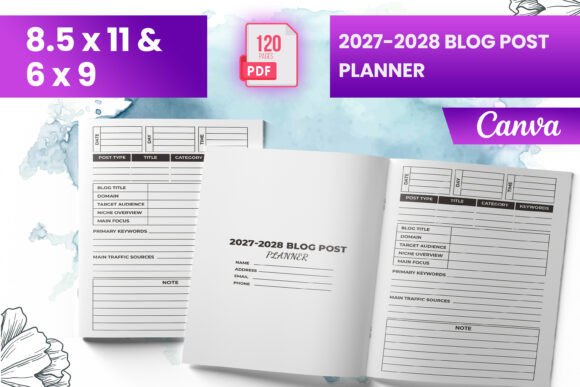
The Blog Post Ideas and Post Planner pages are especially useful for batch planning. Instead of scrambling for topics every morning, you spend one afternoon every quarter filling out ideas across categories. Then, you assign each idea to a specific week and day. By the time you sit down to write, your headline, key points, and target audience are already defined. That shift alone can cut your writing time in half.
For Digital Product Sellers and Entrepreneurs
Selling digital products often means managing multiple content streams—blog posts, email sequences, social media updates, and product launches. A planner that includes both a social media tracker and a net revenue tracker becomes a practical business tool. You can monitor which content drives traffic, which channels convert, and how your efforts translate into actual revenue.
The Goal Tracker and Goal Review pages let you set quarterly objectives and then check your progress. Pair that with the Monthly Assessment sheet, and you have a simple system for continuous improvement. You’re not just posting content—you’re learning what works and refining your approach based on real data.
For Educators, Coaches, and Freelancers
Even if you don’t run a traditional blog, the 2026 Blog Planner adapts to other content-heavy roles. Educators developing course materials can use the planning pages to outline lessons and schedule publication dates. Freelancers managing multiple clients can track deadlines, content formats, and approval workflows. The To-Do List and Notes pages provide flexible space for whatever your workflow demands.
The vision board and brand board pages are particularly valuable for anyone building a personal brand. You can visually define your aesthetic, core values, and audience demographics, then keep those reference points front and center as you plan each piece of content.
What You Get in the File Package
When you download the 2026 Blog Planner, you receive several file formats so you can work however you prefer:
- Editable Canva Template Link – Full customization access
- Print-ready PDF – Professional quality for home or commercial printing
- High-resolution JPG and PNG files – Suitable for digital use or print-on-demand
- 100% customizable original source file – No locked elements
The technical specifications are built for reliability. Standard letter size (8.5 x 11 inches) ensures compatibility with any printer. The 300 DPI resolution delivers sharp, professional results whether you print at home or through a service. The layout is print-ready with no bleed, so you don’t have to worry about trimming or alignment issues.
Using the Planner for Deeper Brand Alignment
One feature I find particularly useful is how the planner integrates brand strategy directly into daily planning. The Brand Basics and My Audience pages force you to clarify who you’re writing for and why. When you tie every post back to those foundational elements, your content becomes more focused and resonant.
The Color Palette and Brand Board pages serve as visual anchors. If you’re creating graphics for social media or your blog, having your brand guidelines right inside your planner means you never accidentally drift away from your visual identity. This consistency builds recognition with your audience over time.
For anyone selling branded digital products, this also means you can customize the planner to match your own product line. If you offer a collection of printables, you can bundle a branded version of this planner as a bonus or standalone product.
Practical Considerations When Choosing a Planner System
Before committing to any planner, it helps to think about your actual workflow. Here are a few points to consider when evaluating whether the 2026 Blog Planner fits your needs:
- Your content volume: If you publish multiple times per week, you’ll appreciate the dedicated post planner and content schedule pages. If you publish less frequently, the monthly overview might be enough—and you can repurpose extra pages for other projects.
- Your preferred format: Do you work better with digital files or printed pages? Because this planner comes as an editable Canva template plus print-ready PDFs and images, you can use it both ways. Keep a digital copy for quick edits and a printed version for offline brainstorming.
- Your brand complexity: If you manage multiple brands or channels, the brand board and audience pages become essential. If you’re a single creator with one consistent brand, you can streamline those sections to suit your needs.
- Your review cadence: The goal tracker and monthly assessment pages encourage regular reflection. If you’re someone who benefits from quarterly reviews, this structure supports that habit well.
How to Get the Most Out of the Planner
Based on working with similar tools, I’d suggest starting with the brand and audience pages before you touch the calendar. Define your visual identity and your target reader first. Then move to the goal tracker and set three to five realistic content goals for the year. From there, use the brainstorming pages to generate a backlog of post ideas. Finally, assign those ideas to specific months and weeks using the post planner and content schedule.
The social media tracker works best when you update it weekly rather than letting it pile up. Spend five minutes every Friday noting which posts went live and any engagement metrics you want to remember. Over a few months, those small data points reveal clear patterns about what resonates with your audience.
The net revenue tracker is particularly helpful for anyone monetizing their blog or content. Track income streams separately—affiliate links, digital products, sponsorships, or services—so you know exactly which channels deserve more of your energy.
Final Observations
The 2026 Blog Planner delivers exactly what a busy content creator needs: structure without rigidity. The combination of strategic planning pages, daily execution tools, and review mechanisms creates a closed loop. You plan, you execute, you review, and you improve. That cycle is the foundation of sustainable content creation.
Whether you’re launching a new blog in 2026 or refining an existing one, this planner gives you a clear framework. And because every page is editable, you’re never locked into someone else’s system. You build the planner around your process, not the other way around. That flexibility alone makes it a practical investment for anyone serious about growing their blog and their brand.