Ultimate Side Hustle Planner
Running a side hustle often feels like juggling too many things at once. You have product ideas floating around, client deadlines to meet, finances to track, and a growing list of tasks that never seems to shrink. The Ultimate Side Hustle Planner was built to bring order to that chaos. It is not just another printable bundle. It is a structured system designed specifically for anyone managing a small business, online shop, freelancing career, or creative side project on top of everything else.
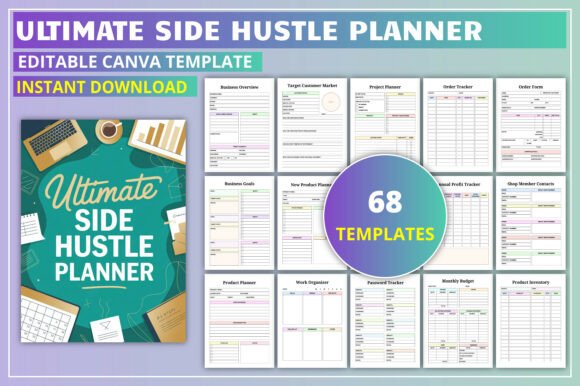
This planner is fully editable in Canva, which means you can adjust fonts, colors, and layouts to match your branding. Whether you sell on Etsy, run a print-on-demand shop, handle freelance client work, or manage a dropshipping store, the planner adapts to how you actually work. It covers ownership planning, business strategy, product management, client work logs, and finance tracking all in one place.
Where and When the Ultimate Side Hustle Planner Becomes Essential
The people who get the most out of this planner are usually in the middle of growing something. They have moved past the idea phase and are actively selling, creating, or serving clients. That transition from hobby to real business is where most people start feeling overwhelmed. Suddenly, you cannot keep everything in your head anymore. You need a system that helps you track weekly tasks, evaluate which products are performing, and set realistic goals without losing sight of day-to-day operations.
Early mornings before a full-time job, late evenings after putting kids to bed, or weekend hours between other commitments are when side hustles happen. This planner fits into those fragmented time slots. The weekly and monthly layouts help you prioritize what actually matters instead of constantly reacting to whatever feels urgent. The Business Overview and Business Goals sections give you a place to step back and check whether your efforts are moving in the right direction.
For Etsy and Print-on-Demand Sellers
If you run a shop on Etsy or use a print-on-demand service, you know how quickly product lines can multiply. One month you are testing five new designs, and the next month you cannot remember which ones actually sold. The Product Planner and New Product List sections let you document each item before you list it. You can note the target customer market, evaluate how each product performs, and compare best and worst sellers without guessing. That data becomes useful when deciding whether to double down on a certain niche or retire a design that is not resonating.
For Freelancers and Client-Based Work
Freelancers often juggle multiple clients with different deadlines, communication styles, and payment schedules. The Client Work Log and Work Time Log give you a dedicated space to track hours, note project requirements, and keep client details organized. This reduces the mental load of remembering who asked for what and when. The Invoice section helps you stay on top of billing so you are not waiting weeks for payments simply because you forgot to send an invoice.
For Side Hustlers Planning Long-Term Growth
It is easy to get stuck in a cycle of weekly tasks without ever looking at the bigger picture. The Long-Term Goals and Business Expansion pages force you to think about where you want your side hustle to be six months or a year from now. The Improvement Planner and Seasonal Ideas sections help you prepare for slow periods and capitalize on busy seasons. If you sell seasonal products or services, this becomes especially valuable. You can plan holiday launches, summer slumps, or promotional periods with actual strategy rather than last-minute scrambling.
For Small Business Owners Wearing Multiple Hats
When you are the owner, marketer, accountant, and customer support person all at once, organization is not optional. The Monthly Budget and Monthly Finances pages give you a straightforward way to track income and expenses without needing a separate accounting tool. The Sales Tracker helps you spot trends month over month. Over time, that data tells you which marketing efforts actually paid off and where you might be overspending.
How Different Users Benefit in Different Ways
Not everyone uses this planner the same way, and that flexibility is part of its strength. A blogger or content creator might lean heavily on the Daily Planner and To-Do Lists to manage editorial calendars and sponsorship deadlines. A small business owner who sells physical products might spend more time in the Product Evaluation and Best Worst Sellers sections to refine inventory decisions. A freelancer may find the Work Organizer and Project Planner pages most useful for keeping multiple client projects from bleeding into each other.
Someone just starting out might use the planner as a way to build discipline. The act of writing down tasks, goals, and financial numbers creates a level of accountability that is easy to ignore when you are only reporting to yourself. More experienced entrepreneurs might use it as a diagnostic tool. When sales dip or motivation fades, flipping through the Business Overview and Improvement Planner sections can reveal blind spots that were hiding in plain sight.
What to Consider Before You Start Using the Planner
The Ultimate Side Hustle Planner is comprehensive, but that does not mean you need to fill out every page every week. Trying to do everything at once can feel overwhelming, especially if you are already short on time. A better approach is to start with the sections that address your biggest pain point right now. If finances are a mess, focus on the Monthly Budget and Sales Tracker first. If you are launching a new product, use the New Product Planner and Target Customer Market pages before worrying about long-term goals.
Because the planner is editable in Canva, you have the freedom to customize it before printing or using it digitally. That means you can remove sections that are not relevant to your business, adjust the color scheme to match your brand, or add your own logo. This customization step is worth doing upfront, especially if you plan to use the planner daily. A tool that looks and feels like yours is more likely to be used consistently.
Consider how you prefer to work. Some people thrive with a printed planner they can write in physically. Others prefer keeping everything digital and editing directly in Canva or importing the pages into a note-taking app. The planner supports both approaches. If you print it, choose paper that works well with your favorite pen. If you use it digitally, make sure your device supports PDF annotation or Canva editing so you are not fighting with the format.
Connecting Planner Features to Real Outcomes
A planner is only useful if it changes how you actually operate. The Ownership Planning section, for example, might seem simple at first. But writing down your business name, contact details, and mission statement in one place helps you stay grounded when decisions get complicated. The Weekly Planner and Monthly Planner are not just calendars. They become tools for time blocking, prioritizing high-impact tasks, and protecting your limited hours from distractions.
The Finance Sales section does more than track numbers. It gives you a feedback loop. When you see which products or services generate the most revenue, you can make smarter decisions about where to invest your time and marketing budget. The Product Evaluation and Best Worst Sellers pages take the guesswork out of deciding what to keep and what to let go.
The Work Projects and Client Work Log pages help you build better relationships with your clients. When you have clear records of what was discussed, what was delivered, and what was invoiced, misunderstandings become less common. Clients notice that level of professionalism, and it often leads to repeat work and referrals.
Who Should Consider This Planner
If you are someone who has a side hustle but feels like it controls you instead of the other way around, this planner is worth your time. It works for creators who sell digital products, educators who offer courses, marketers who manage multiple campaigns, and publishers who need to track content schedules. It also works for hobbyists who are turning a passion into profit and need a better system than sticky notes and scattered spreadsheets.
The planner does not assume you already have a large business. It meets you where you are, whether that is a single product shop or a growing agency with multiple clients. The emphasis on long-term goals, improvement planning, and seasonal ideas means it grows with you. As your side hustle evolves, the sections you rely on will shift naturally.
What makes the Ultimate Side Hustle Planner different from generic planners is that it is built around the specific rhythms of running a business on the side. It understands that your time is limited, your energy is split, and your priorities change week to week. Instead of forcing you into a rigid system, it gives you adaptable tools that fit the way you actually work.